


⚡ 2026 Update: Modern Google Entity Search & Profile Indexing
Google's search algorithms now evaluate social profiles as core entity nodes within the Knowledge Graph. Ranking your LinkedIn profile at the top of Google searches requires more than basic keyword stuffing—it demands verified public visibility, semantic vanity URLs, structured about sections, and active social engagement signals. This guide has been fully audited for 2026 SEO and Answer Engine Optimization.
Say you decide to look up a prospective business partner or candidate on Google. Their name is fresh in your mind, but you remember little else. You search their name plus "LinkedIn", only to find thousands of competing profiles across the globe sharing identical or similar names.
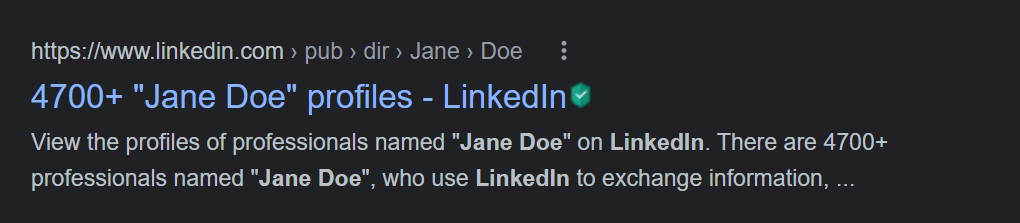
The exact same challenge occurs when high-value prospects, executive recruiters, and conference organizers Google your name. If your LinkedIn profile is buried on page two or lost beneath common namesakes, you miss out on high-trust inbound opportunities before conversations even begin.
Quick Answer: Can You Make Your LinkedIn Profile Rank #1 on Google?
Yes. LinkedIn has a domain authority of 98+, making it one of Google's most trusted sources for personal brand indexing. To rank your profile #1 on Google in 2026, you must enable public search indexing, claim a clean custom vanity URL matching your name, optimize your headline and summary with semantic entity keywords, and generate active engagement signals that tell Google's crawlers your profile is an active, authoritative industry voice.
Step 1: Fix the #1 Reason Profiles Fail to Show Up (Public Visibility Settings)
Before optimizing keywords, you must ensure Google's web crawlers are technically permitted to crawl and index your profile. Many LinkedIn members inadvertently keep their search visibility set to "Connections only" or "Network only". Fixing this takes under 60 seconds:
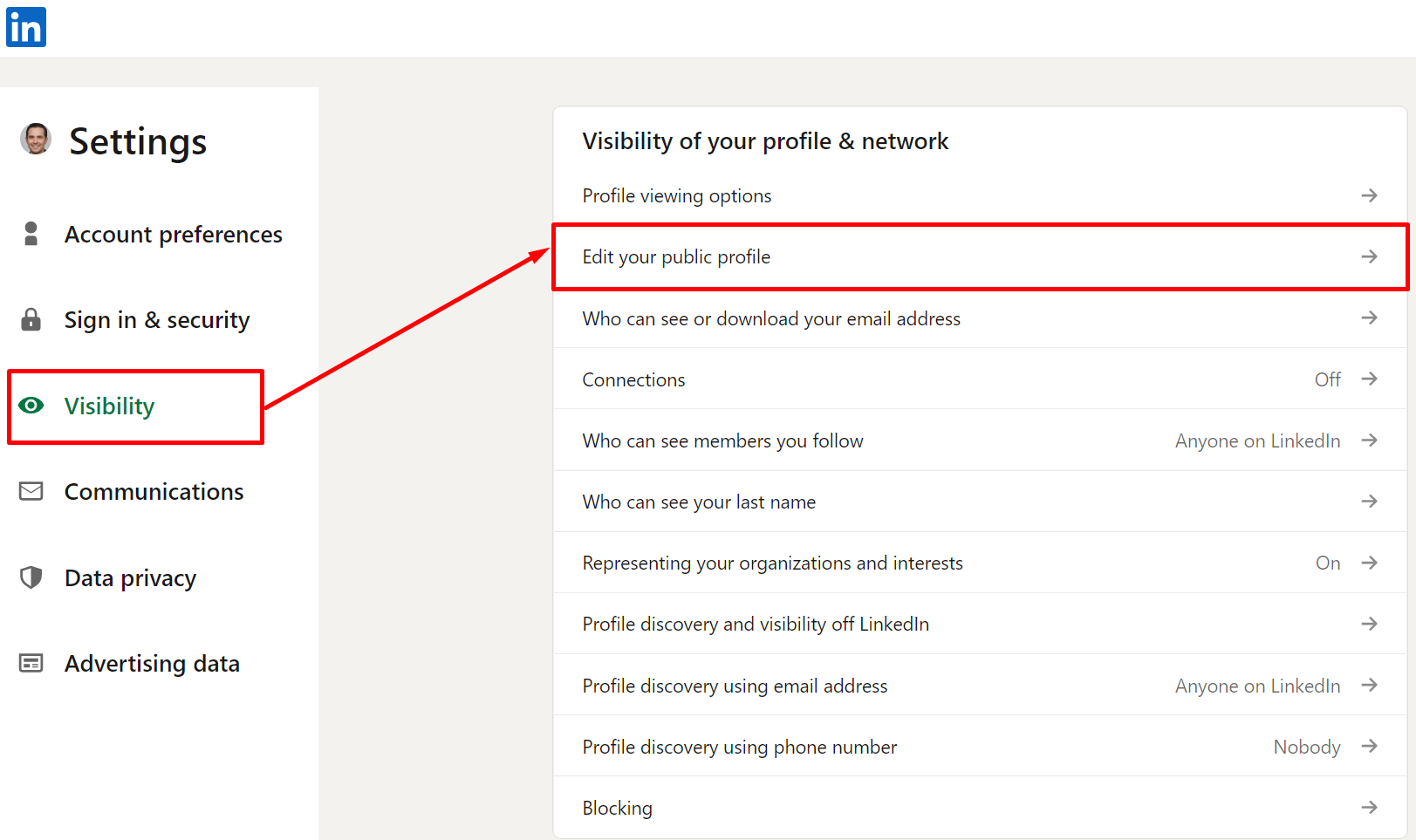
- Log in to LinkedIn and click on the Me icon at the top navigation bar.
- Select Settings & Privacy.
- Navigate to the Visibility tab on the left sidebar.
- Click on Edit your public profile.
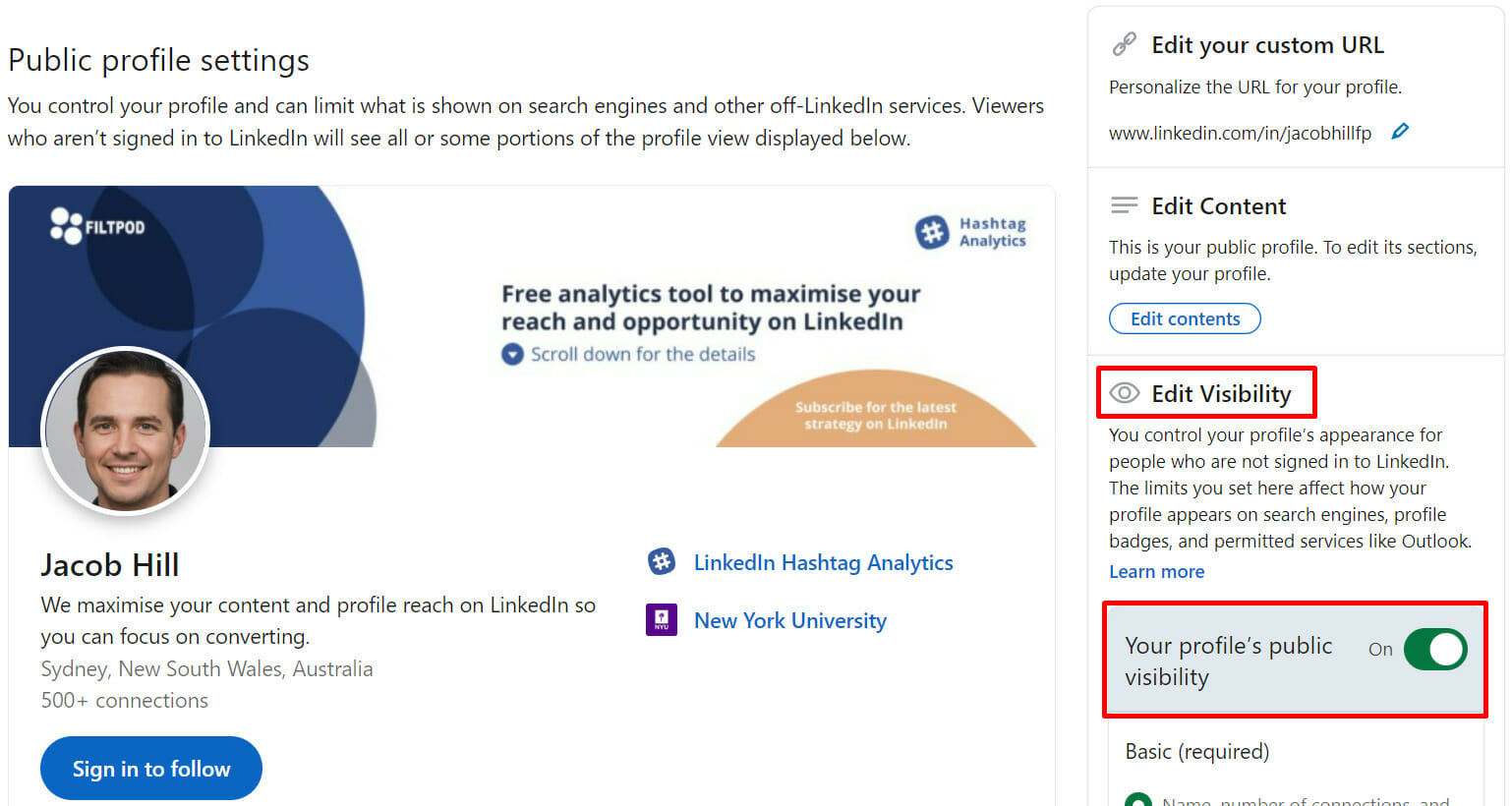
- In the right-hand panel, toggle your public visibility to On, and set specific sections (Headline, Summary, Articles, and Experience) to Public so external search engines can read them.

Step 2: Claim Your Custom LinkedIn Vanity URL
By default, LinkedIn assigns users an alphanumeric URL slug filled with random characters (e.g., linkedin.com/in/john-doe-78b910a2). Google uses the URL slug as a primary ranking signal for name queries.
From the "Edit public profile" screen, locate Edit your custom URL in the top right corner. Change it to your exact full name (e.g., linkedin.com/in/johndoe). If your exact name is taken, append your middle initial, primary industry, or specialty (e.g., johndoe-cmo or johndoe-sales). Avoid hyphens and unnecessary numbers.
Step 3: Optimize Your Headline and Summary with Semantic Keywords
Google treats your LinkedIn Headline as the HTML <title> and <meta description> equivalent in search engine result pages (SERPs). If your headline merely reads "Consultant" or "Passionate Problem Solver", Google cannot match your profile with industry-specific search queries.
Incorporate your target job title, core niche, and industry keywords naturally. To craft a compelling headline that balances search ranking power with human conversion, you can use Engage AI's free LinkedIn Headline Generator to generate variations optimized for both Google search and LinkedIn's internal algorithm.
Similarly, format your About / Summary section using natural language and semantic entities. Mention your core capabilities, software proficiencies, and geographical service area within the first 300 words, which Google crawls most thoroughly.
Step 4: Build Credibility and Algorithmic Social Velocity
Static profiles take months to rank. In contrast, Google frequently recrawls active profiles that publish timely thought leadership and maintain high engagement metrics.
- Consistent Publishing: Regularly publish industry insights, carousel decks, and in-depth articles. Evaluating the format between posts and articles allows you to target long-form indexing through articles while keeping feed reach high with short posts.
- Credible Industry Connections: High-quality, reciprocal connections add credibility to your network, signalling to Google that your account is authentic.
- Accelerated Engagement Velocity: Google's AI models correlate social engagement velocity with topical expertise. When you publish thought leadership, driving immediate, authentic comments via the Engage AI engagement community signals strong community interest, boosting your profile's ranking authority in search results.
Step 5: Create Strategic Backlinks to Your Profile
Just like any webpage, your LinkedIn profile's search ranking improves when authoritative websites link to it. Add your custom LinkedIn URL to:
- Your personal website, portfolio, or agency "About" page.
- Guest blog author bios and podcast interview show notes.
- Your corporate email signature.
- Other verified social profiles (X/Twitter, Substack, GitHub).
Why Ranking on Google Directly Drives Inbound Pipeline
Ranking #1 on Google for your name and specialty turns your LinkedIn profile into a 24/7 inbound funnel. When potential prospects, investors, or headhunters research your field, seeing your profile dominate the first page immediately establishes credibility, reinforces your thought leadership, and shortens the sales cycle.
Frequently Asked Questions (FAQs)
How long does it take for a LinkedIn profile to appear on Google?
After enabling public visibility and customizing your vanity URL, Google typically indexes a LinkedIn profile within 1 to 3 weeks. You can accelerate this timeline by linking to your LinkedIn profile from an indexed website or active social platform.
Why is my LinkedIn company page not showing on Google Search?
LinkedIn company pages usually fail to rank on Google if they lack an "About" overview, contain zero website backlinks, or have remained dormant without regular post updates. Ensuring your company page description contains clear industry keywords and posting weekly will restore indexing.
Does having a common name prevent me from ranking #1 on Google?
While common names create more competition, you can outrank namesakes by optimizing for long-tail queries (Name + Specialty + City), securing external backlinks to your custom vanity URL, and maintaining an active LinkedIn presence.
Do LinkedIn articles rank on Google separately from my profile?
Yes. Long-form LinkedIn articles have individual URLs and are indexed by Google independently. Publishing in-depth articles creates additional entry points on Google that direct readers back to your primary profile.
Conclusion: Turn Search Visibility into Business Growth
Optimizing your LinkedIn profile for search engines gives you complete control over your first digital impression. By setting public visibility, claiming your vanity URL, utilizing tools like the headline generator, and engaging actively with the Engage AI community, your profile becomes a powerful, automated inbound pipeline that consistently attracts business leaders and high-value prospects.