


AI slideshow makers promise a finished 10-slide deck in less time than it takes to sip your first coffee. Yet most still churn out slides that look copy-and-paste.
So we ran a controlled test: the same 10-slide sales pitch built in nine leading tools, clocking generation speed and grading each deck for polish, brand fit, collaboration, cost, and privacy.
Below is our field report—plain language, real numbers, and clear guidance to help you pick the app that cuts prep time without revealing a bot behind the deck.
For creators specifically targeting LinkedIn feed reach, the free Engage AI LinkedIn® Carousel Generator lets you design and export swipeable 4:5 portrait vector PDFs with direct on-canvas editing and zero watermarks.
How we tested and what mattered
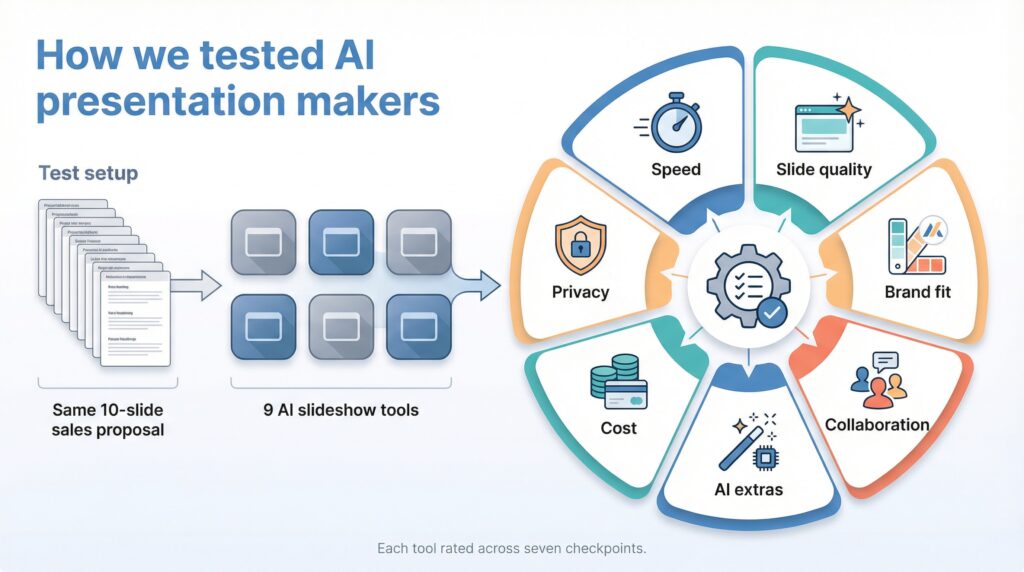
We set aside vendor hype and ran our own experiment. Each tool received the same brief (a ten-slide sales proposal), and we timed the build from prompt to first draft.
We ran seven tests. First, raw speed. Second, slide quality: three reviewers graded clarity, design balance, and client-readiness. Third, brand fit. We checked whether templates respected logo, color, and font settings without manual fixes. Fourth, collaboration. Could a colleague join, comment, and co-edit without file-conversion hassle? Fifth, AI extras such as live data, image generation, and polls. Sixth, cost: dollars versus hours saved. Seventh, privacy. We studied each policy to see who keeps your slides private and who trains models on your content.
These seven checkpoints—speed, quality, brand fit, collaboration, AI extras, cost, and privacy—shape every ranking that follows. Ground rules covered, the tool-by-tool results start next.
The best AI presentation makers tested
We lined up nine contenders, but only one could go first. We chose Plus AI because it lives inside Google Slides and PowerPoint, the places many of us already build decks.
Plus AI: draft, edit, and present without leaving your slide tool
Open an existing deck, click the Plus AI tab, type a prompt, and a full presentation appears in seconds. That everyday convenience helps explain why the ai presentation maker now tops 1 million installs and carries a 4.8-star average rating across Google Workspace and Microsoft AppSource. Because the slides remain native files, you can tweak fonts, swap charts, and invite teammates, exactly as you normally do.
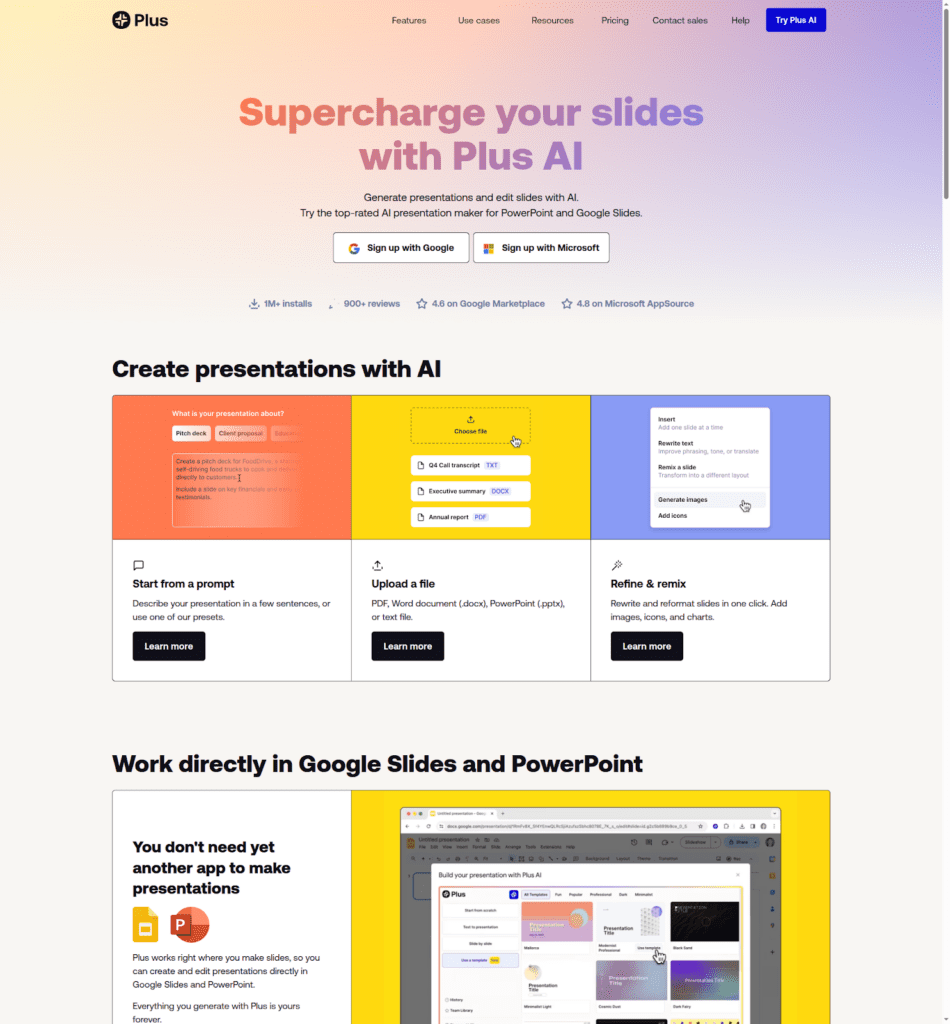
Plus AI presentation maker — create slides directly in Google Slides and PowerPoint
The quality-to-time ratio stands out. Our ten-slide deck generated in 1 minute and needed only minor copy edits to reach client-ready status. No broken layouts. No copy-paste gymnastics.
Brand fit stays sharp. Apply your template once, and Plus adds new content in the right colors and fonts every time, saving our designers from post-AI cleanup.
Privacy also scores high. Plus follows enterprise security practices and holds a SOC 2 Type II report, so legal teams stay calm while creatives move fast.
If you already work in Google Workspace or Microsoft 365 and want AI speed without learning a new platform, start here. Free credits let you run a real project and judge with your own eyes.
Beautiful.ai: instant polish for non-designers
Beautiful.ai isn’t a content robot; it is a layout pro.
Drop in headlines, bullets, or a chart, and the software snaps each element into a clean, balanced frame in seconds. In our test, the draft deck needed zero box or font tweaks, so we spent editing time on story, not spacing.

Beautiful.ai smart slide layout and auto-formatting screenshot
Branding takes one click. Load your palette once, and every slide follows those colors and typefaces automatically. That consistency beats the one-off look many AI tools create.
There is a limit. Beautiful.ai will not write the narrative for you, and its templates share a familiar style. If design is your bottleneck, though, this tool feels like hiring a fast, reliable art director without expanding the team.
Canva: a familiar playground with an AI twist
If you already design social posts in Canva, shifting that muscle memory to slide work feels effortless. Type a short brief into Magic Write, choose a presentation template, and Canva sketches an outline with matching visuals in under two minutes.
Range is the standout feature. Millions of photos, icons, and charts sit one search away, so you rarely leave the canvas looking for assets. Need consistency? Brand Kit locks your logo, colors, and fonts to every deck, so interns, managers, and executives work from the same style source.
Content AI here is assistive, not autonomous. The tool suggests headings, bullets, and imagery, but you remain the storyteller. That balance keeps slides sounding like you, not a script.
Canva’s free tier covers basic decks. Unlimited AI prompts and premium templates cost about the same as a single stock-photo subscription, yet replace several services.
For solo creators and small teams who value design freedom paired with gentle AI guidance, Canva feels less like a leap and more like a natural next step.
Gamma: raw speed, but expect editing laps
Gamma makes one promise: type a prompt, get a full deck fast. On that metric, it delivers. Our ten-slide draft appeared in 43 seconds.
The catch arrives later. Text leans on broad statements, and visuals repeat the same icon-plus-headline pattern. One enterprise tester logged 2–3 hours of cleanup before the slides felt client-ready.
If blank-page syndrome strikes, Gamma is a strong jump start. Generate, prune, then move the bones into PowerPoint or Google Slides for final styling. Just budget time to humanize the script and tighten design.
For brainstorms, class projects, or rapid ideation, the speed rush is real. For a boardroom deck due tomorrow, plan an extra editing lap.
Tome: storytelling first, export later
Tome focuses on narrative flow. Give it one sentence, and it drafts a deck that follows a clear arc: hook, tension, resolution, and call to action.
A built-in image generator supports the story. Backgrounds align with each slide theme, so your clean-energy pitch arrives in soft teal skylines instead of mismatched clip art.
Coherence scored high in our review; the hand-off did not. Tome runs in the browser, exports only to PDF, and stretches slide dimensions to fit its scrollable viewer. If your team needs a .pptx file, plan on a manual rebuild.
Reach for Tome when sketching a pitch, shaping a workshop, or sharing a link-first presentation with investors. Switch to PowerPoint once the calendar shows an in-person meeting.
Pitch: built for teams, now powered by AI
Pitch has long offered real-time co-editing, sleek templates, and a slide library you can browse like a playlist. The new AI layer pushes that speed even higher.
Ask Pitch AI to tighten dense text, draft an agenda slide, or rewrite bullets for clarity, and it responds in seconds. Because edits happen inside the shared deck, feedback loops stay short, and everyone sees improvements right away.
Design quality remains Pitch’s standout. Slides look conference-ready before you even choose a theme. Add your brand kit once, and every new slide sticks to the correct colors and fonts, which keeps marketing on board.
The trade-off? Pitch will not create a full ten-slide deck from one prompt. You still guide the structure, slide by slide. That control suits teams who care about detail; it is less ideal if you want a hands-off generator.
Choose Pitch when several people shape the story and aesthetics matter as much as speed. Its AI strips away busywork so your team can focus on persuasion, not pixels.
Decktopus: the five-minute fix for simple decks
Decktopus opens with a short questionnaire instead of a blank canvas. Choose topic, tone, and audience; click generate, and our ten-slide outline appeared in 35 seconds.
The output is plain yet orderly. Headlines, bullet points, and stock photos land in a safe default theme, ideal for internal updates, class assignments, or webinars where speed matters more than style.
Customization stays light. You can switch themes, edit text, and replace images, but you cannot freely drag elements. That structure keeps slides tidy but limits creative flair.
The free tier adds a Decktopus watermark to every export. A modest monthly fee removes the logo and unlocks PDF or PowerPoint downloads.
Think of Decktopus as an auto-formatting notepad. When your manager says, “Give me five slides by lunch,” it finishes the job with minutes to spare.
SlidesAI.io: turn dense text into tidy bullets
Some days you do not need a new idea; you need a 20-page report squeezed into ten clear slides. SlidesAI handles that task.
Paste paragraphs into the sidebar, choose slide count, and click generate. In our test, a ten-slide outline appeared in 28 seconds, with headlines and bullets ready inside Google Slides or PowerPoint.
Design starts minimal, which is fine; you can apply your own template afterward. What you save is thinking time. The AI sorts structure and trimming, so you focus on insight.
SlidesAI will not fetch images or charts. It hands you a text skeleton and steps aside. Pair it with your company theme, and dry research turns presentable in minutes.
For consultants, analysts, and students asked to “turn this doc into slides,” SlidesAI is a quick bridge from prose to presentation.
Presentations.AI: enterprise polish with compliance built in
Presentations.AI builds a full platform around corporate slide requirements. Sign up, and the software pulls colors and logos from your website, then applies them to every new deck.

Presentations.AI branded enterprise slide deck screenshot
Our ten-slide test proposal looked as if an in-house designer had refined each page rather than a generic template.
Copy quality ranked above other generators. Sentences felt precise, so edits were minimal. PowerPoint exports stayed pixel perfect. Many rivals still stumble there.
Security teams will appreciate the paperwork. Presentations.AI holds a SOC 2 Type II report and states that your slides remain your property, never model training fodder.
Pricing sits in “contact sales” territory, aimed at departments that live and die by slide decks, such as consulting, banking, or large sales teams. For solo creators it is overkill, but enterprises tired of policing off-brand slides may value the added control.
Visme: data-heavy slides without calling a designer
Visme works more like a compact creative studio than a basic slide maker. Charts, maps, animations, and voice-over tools sit one click away, and an AI writer can draft or refine copy on demand.
In our test, we imported a CSV, chose a column chart, and within 20 seconds the numbers appeared as branded visuals. That speed sets Visme apart when your story relies on data rather than headlines.
Complexity is the trade-off. New users face more menus than in Canva or Pitch, and heavy animations can slow older laptops. If you also build reports, infographics, or webinars, though, the learning curve soon pays off.
Pricing sits in the middle of the pack. About 15 dollars per user each month unlocks downloads and analytics; advanced collaboration costs more. For creative teams juggling several content types, Visme serves as a single workspace, especially when slides need charts that persuade.
Sendsteps AI: presentations that talk back
Most generators stop at pretty slides, but Sendsteps adds live polls, quizzes, and word-cloud questions directly inside the deck.
In our test, it offered an ice-breaker poll after the intro slide and an exit quiz that graded the audience in real time. Set-up took about 60 seconds. Participants scan a QR code, vote from their phones, and results appear on the slide.

Sendsteps AI interactive poll and quiz slide screenshot
Design is functional rather than flashy, yet the engagement lift is noticeable. Trainers and webinar hosts reported higher retention when the deck posed questions instead of the speaker asking for a raised hand.
Free plans limit participant numbers, so large conferences need a paid tier. For classrooms, workshops, and remote teams seeking interaction, Sendsteps turns a monologue into a dialogue with minimal effort.
Zoho Show with Zia: a safe harbor for privacy-first teams
Zoho skips flashy generative tricks. Instead, the Zia assistant fine-tunes wording, suggests layouts, and lives inside an office suite you can run on-premise.
For regulated sectors, that one detail matters. Finance, healthcare, and government teams can keep every slide behind the firewall while still enjoying gentle AI support.
In our test, Zia flagged 14 wordy sentences, proposed cleaner bullet structures, and pulled licensed images that fit the content. It never tried to draft the full deck, and that restraint keeps human control in clear view.
Template variety trails Canva and Pitch, and learning another suite can feel redundant if you already use Google or Microsoft tools. When IT says “no external cloud,” though, Zoho Show provides AI help without breaking policy.
How the tools stack up
After a week of side-by-side testing, patterns appeared.
Plus AI and Beautiful.ai produced the most polished slides with minimal editing. Gamma was the fastest generator yet required the heaviest cleanup, while Tome offered smoother narrative flow at the cost of slower exports.
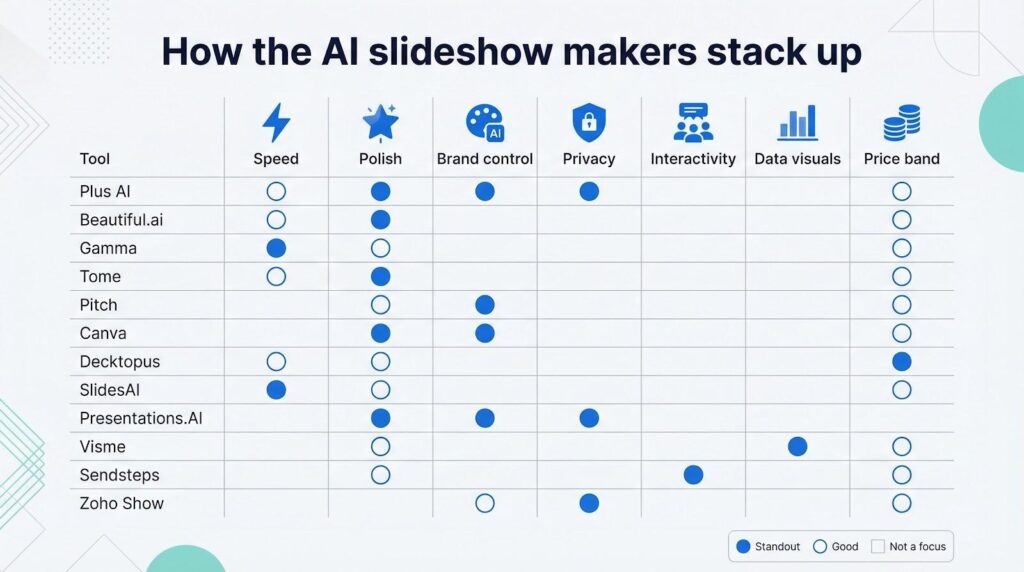
Brand control leaned toward Presentations.AI, Plus AI, and Pitch; each applied a style guide without manual fixes. Canva, Visme, and Decktopus include brand kits, but consistency still relies on user oversight.
On privacy, only Presentations.AI and Plus AI publish SOC 2 Type II reports, a key advantage for enterprise teams.
For speed, Gamma delivered a full deck in under 60 seconds, and SlidesAI distilled text into bullets faster than copy-paste.
Sendsteps owned interactivity; no other contender built live polls into the slides.
Pricing clustered more tightly than expected. Most pro tiers cost 8 to 15 dollars per user each month. Outliers: Presentations.AI (contact sales) at the top and Gamma’s generous free credits at the bottom.
So which tool fits your case?
- Need on-brand slides inside Google or PowerPoint? Choose Plus AI.
- Staring at a blank page? Gamma or Tome provides a quick draft.
- Want polished design without design training? Beautiful.ai or Canva.
- Heavy on data visuals? Visme.
- Seeking audience engagement? Sendsteps.
- Working under strict security rules? Presentations.AI or Zoho Show.
No single app wins every scenario, but the right match saves hours while keeping decks human in style and substance.
How to choose the right AI presentation maker
Start with your pain point, not the feature list.
Blank slides freezing you? You need a fast draft machine. Gamma or Tome can generate a ten-slide outline in about 60 seconds; just plan editing time afterward.
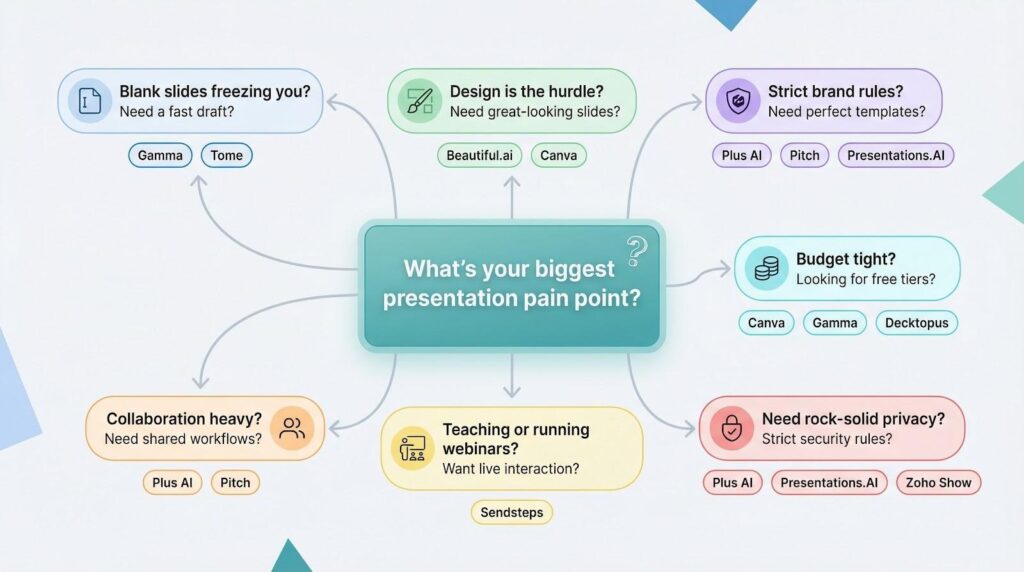
If design is the hurdle, lean on layout intelligence. Beautiful.ai and Canva handle spacing, color, and alignment while you focus on story.
Working under strict brand rules? Tools that sync with your template—Plus AI, Pitch, and Presentations.AI—keep every font, logo, and hex code in place on the first pass.
Collaboration heavy? Stay where your team already works. Google shops pick Plus AI, Microsoft environments watch for PowerPoint Copilot, and cloud-first teams lean toward Pitch.
Teaching, training, or running webinars? Sendsteps builds polls and quizzes without extra platforms.
Need rock-solid privacy? Read the policies. SOC 2 badges narrow your field to Plus AI and Presentations.AI, with Zoho Show as the on-prem option.
Budget tight? Canva, Gamma, and Decktopus all offer usable free tiers. Paying ten dollars to save five hours is still a bargain if you ship decks regularly.
Conclusion
Before you commit, run a real project in two contenders. The right tool feels invisible: you click Generate, tweak a slide or two, and return to work that wins deals.